Macros for CorelDraw are easy to install. Some come with an installer. You just click on the installer and they install automatically. Of course restart CorelDraw after installing.
(My commercial macros DO NOTcome with an installer and are only sold to those who have intermediate to professional experience with CorelDraw and macros).
Extract or copy the GMS file to:
 In X5 put .gms file here: C:\Users\<your user name>\AppData\Roaming\Corel\CorelDRAW Graphics Suite X5\Draw\GMS In X5 put .gms file here: C:\Users\<your user name>\AppData\Roaming\Corel\CorelDRAW Graphics Suite X5\Draw\GMS
In X6 put .gms file here: C:\Users\<your user name>\AppData\Roaming\Corel\CorelDRAW Graphics Suite X6\Draw\GMS
In X7 put .gms file here: C:\Users\<your user name>\AppData\Roaming\Corel\CorelDRAW Graphics Suite X7\Draw\GMS
In X8 put .gms file here: C:\Users\<your user name>\AppData\Roaming\Corel\CorelDRAW Graphics Suite X8\Draw\GMS
In v.2017 put .gms file here: C:\Users\<your user name>\AppData\Roaming\Corel\CorelDRAW Graphics Suite 2017\Draw\GMS
In v.2018 put .gms file here: C:\Users\<your user name>\AppData\Roaming\Corel\CorelDRAW Graphics Suite 2018\Draw\GMS
In v.2019 put .gms file here: C:\Users\<your user name>\AppData\Roaming\Corel\CorelDRAW Graphics Suite 2019\Draw\GMS
In v.2020 put .gms file here: C:\Users\<your user name>\AppData\Roaming\Corel\CorelDRAW Graphics Suite 2020\Draw\GMS
There are no CorelDraw 2021 macros available. See 2023 macro package. Although not officially supported, the 2023 macros are unlocked for CorelDraw 2021
There are no CorelDraw 2022 macros available. See 2023 macro package. Although not officially supported, the 2022 macros are unlocked for CorelDraw 2022
In v.2023 put .gms file here: C:\Users\<your user name>\AppData\Roaming\Corel\CorelDRAW Graphics Suite 2023\DrawPE\GMS
IMPORTANT NOTE: If you do not see the GMS folder it is because you have not started VBA yet in your CorelDraw application. I recommend you go to Tools > Options and in the setting for VBA uncheck Delay load VBA.
In older versions of Windows and CorelDraw you can put here (pre XP sp3):
C:\Program Files\Corel\CorelDRAW Graphics Suite X4\Draw\GMS
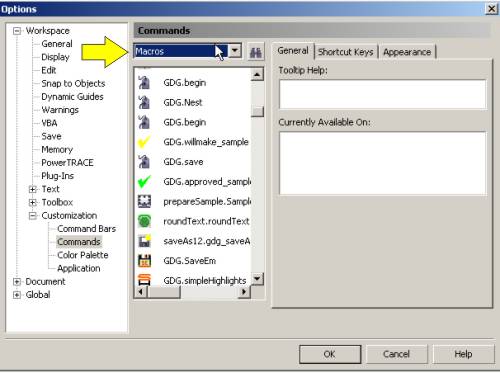
After installing the macro either by and installer or by copying the GMS file to the correct location then you need to put a shortcut in CorelDraw so you can run it. Go to Tools>Customize |



 MyAccount